

Verify accounts using online banking
For account verification, users first sign into their online banking, and then merchants retrieve, authenticate, and confirm the user’s access to the bank-qualified account information. Merchants can then tokenize and process this data on their own platform, ensuring compliance and mitigating risk.
Use the information provided here to learn how to use the Trustly user interface (UI) to retrieve a bank-authorized transaction and then retrieve verified user and account data. You’ll also learn how to integrate Trustly into your platform and how to support Micro Challenge Deposits or add aggregated CashFlow data to your Trustly integration.
To implement account verification, you’ll complete the following tasks:
- Integrate the Trustly UI to Create an authorized transaction.
- Retrieve a user’s bank account and routing information by calling the Get Account Balance API.
- Retrieve additional user information, such as name, address, and phone number, by calling the Get Account Users API.
- Use the retrieved bank and user information for further processing or user registration.
Transaction authorization workflow
The following diagram shows the transaction authorization workflow:
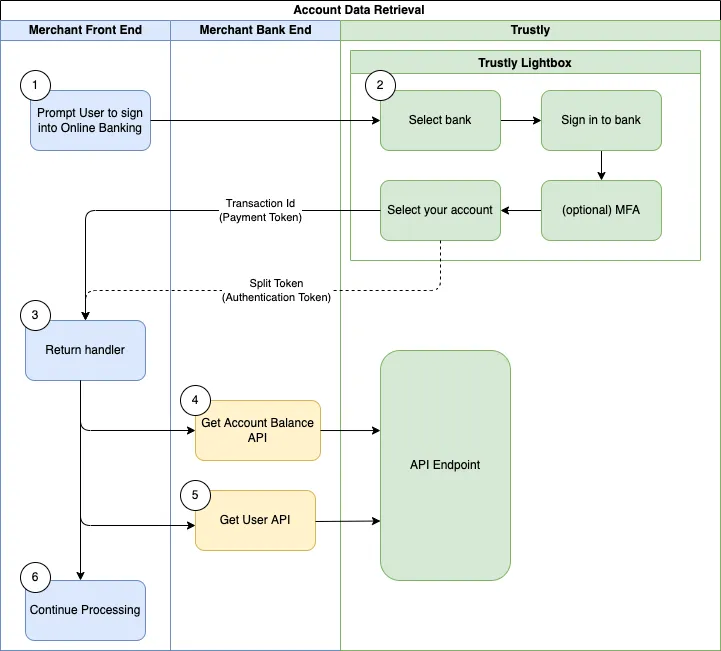
Create an authorized transaction
Retrieving account data begins with acquiring a bank authorization from a user. This requires integrating the Trustly UI library into your user-facing application client.
- In your website or mobile application, add the Trustly UI SDK to render the Select Bank Widget or launch the Lightbox. See the Trustly SDKs.
- Define the data to be passed to Trustly and set the
paymentTypeproperty to the string"Retrieval"to create the correct transaction type. - When the Trustly Lightbox opens, the user selects their bank from the list, authenticates, and selects their account.
- After a successful authorization, the Lightbox redirects the user to the
returnUrlprovided in theestablishDataobject. - Create a Redirect URL to where your application server collects the details of the new Trustly transaction, including the
transactionIdand other important properties to associate with the user who created the authorized transaction.
Retrieve bank and account information
Calling the Get Account Users API allows you to retrieve additional identifying information about the user, such as their name, address, and phone number.
To retrieve the specific banking information selected for a given transaction, execute a GET request to the Get Transactions endpoint. You must include the Bank Account Authorization transaction ID as a path parameter: /transactions/{transactionId}. For more information, see Get Account Balance
Get Account Balance API
Perform every Account Data API call only after the Data Ready event is received. This event may take some minutes after the transaction is authorized. Calling the Account Data endpoints before this event may result in incomplete analysis or data aggregation. Additionally, if a significant amount of time has passed since the user authorized the transaction, call the Refresh Transaction API prior to using the Get Account Balance API to ensure the data provided is up to date.
The following is an example of a GET request to the Get Account Balance endpoint.
Response
The Get Account Balance API returns a JSON response containing the Bank Account data you can use in your application.
Key fields
You can use the information in this response to display the selected payment method to your user and integrate the account and routing numbers into your application.
Example response (abbreviated)
Retrieve user information
The Get Account Users API allows you to retrieve the personal information (name, address, phone, email, and so on) of the user from their selected bank account. You can use this data to pre-fill registration fields or any other information your user typically enters manually.
Get Account Users API
Data Ready Event Notification
Calling any of the Account Data APIs for a new authorization transaction prior to receiving the DataReady event can result in partial data being returned. To ensure optimal performance, wait to receive the DataReady event prior to making a request to an Account Data API.
Execute a GET request to the Get Account Users endpoint. In the request path, replace the {transactionId} path parameter with the transactionId of the Bank Account Authorization you created when you created an authorized transaction. For example:
The Get Account Users call returns a JSON response with User data that you can use in your application. Relevant fields from the response include:
name: Name(s) associated with the user’s bank account.address: Address(es) associated with the user’s bank account.phone: Phone Number(s) associated with the user’s bank account.email: Email Address(es) associated with the user’s bank account.
For more information, see Get Account Users .
Example response (abbreviated)
This information can be used to pre-fill or display the user’s information in your user flow. You can also use this information to validate the personal information the user may have previously provided in your flow.