

Funding Report
The Funding Report contains all funds transferred (credits and debits). All transactions are part of a batch that Trustly sends to the merchant’s bank account for the reporting period.
The Funding Report structure
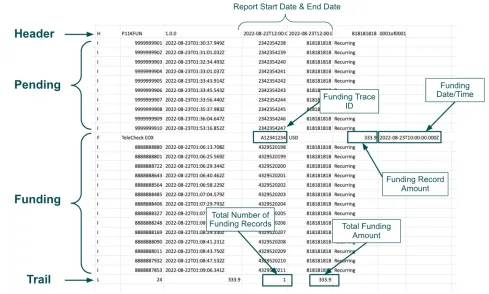
The Funding Report consists of individual rows of data. Each row provides one of four types of data, identified by a unique Record Type Indicator:
- Header (
H): Always the first row of the report. - Funding Record (
F): Represents a single batch settlement from the payment processor. - Item Record (
I): Represents an individual transaction (the core data). - Trail (
L): Always the last row, providing a final summary of the report.
Understand transaction status
To properly reconcile funds, you need to understand how the Funding Report categorizes pending and settled transactions.
Pending transactions
If an item record is pending (not yet settled), it appears at the top of the report, above the funding records. Pending item records have an amount of $0, do not have a funding trace identifier, and Trustly includes them in the report to show status changes that affect future settlements.
Settled transactions
Transactions that have settled appear as item records under a funding record. This indicates which batch settlement they were in. A single report may contain multiple funding records.
Trail items
The Trail provides a summation of the report’s contents. It shows the total number of transactions, the total number of funding records, and the total amount settled to the merchant.
File format
Each line in the Funding File uses a Record Type Indicator as a prefix to identify the type of information it conveys.
Header
The first line of the report is always the Header. For example:

The following table lists the fields and information contained in the Header.
Funding record
A Funding Record is created for each batch settlement that takes place with the payment processor. The individual Item Records under each Funding Record make up the sum of the settlement. For example:

The following table lists the fields and information contained in the Funding Record line.
Item record
An Item Record is a transaction that occurred with the merchant. For example:

The following table lists the fields and information contained in the Item Record line.
V3 - Default layout displays item records that are not linked to transactions, such as returned sweep and adjustment (ATP).
Trail
The Trail indicates the end of the report and is a summation of the records within the report. For example:

The following table lists the fields and information contained in the Trail line.
Funding report cut offs
Based on the payment type, funds settle to the merchant or consumer account according to the cutoff days and times and the expected settlement date. This information helps you determine when the transactions appear in the merchant settlement report.
Most transactions appear in the funding report on the business day following settlement to the merchant account. Contact your Customer Success Manager for the exact cutoff days and times based on the payment types you use.