

Reconciliation & Funding report
Reconciliation & Funding report
The Reconciliation & Funding report lists all transactions that were created during the reporting period. Real-Time Payment (RTP) transactions are excluded.
Generate the Reconciliation & Funding report
-
Sign in to the Merchant Portal, then expand Reports in the left pane.
-
Select Reconciliation & Funding.
-
Select a start date and an end date.
The report period can’t be greater than 31 days due to file size. To retrieve transactions or settlements for a specific day, select the following business day. For example, selecting a start date of 08/23/2022 and an end date of 08/23/2022 provides all transactions created on 8/22 for the Reconciliation Report and all settlements that occurred on 8/22 for the Funding Report.
-
Select the report timezone.
The timezone option only determines the date and time the report displays. It doesn’t determine which transactions Trustly includes. Trustly always retrieves transactions from 12:00 PM to 11:59 AM Coordinated Universal Time (UTC) on the selected days. If you select a specific time zone, the time converts from UTC to your chosen time zone.
-
Select the report output:
- Download: Downloads a compressed file to your computer.
- SFTP: Generates a compressed file on the merchant’s Secure File Transfer Protocol (SFTP) site.
-
Click Generate.
Read the Reconciliation & Funding report
The Reconciliation Report consists of individual rows of data. Each row provides one of three types of data, identified by a Record Type Indicator:
- Header (
H) - Transaction Record (
T) - Trail (
L)

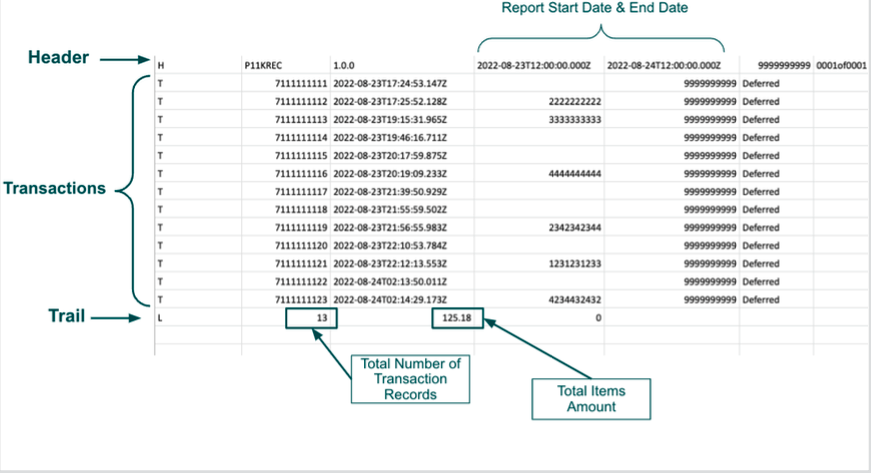
Every report begins with the Header and ends with the Trail. All transaction records in the report reflect the transactions created during the reporting period. The transaction status reflects the current status for that record.
Some transactions have a Parent Transaction ID, or original transaction identifier, as shown in the following example.
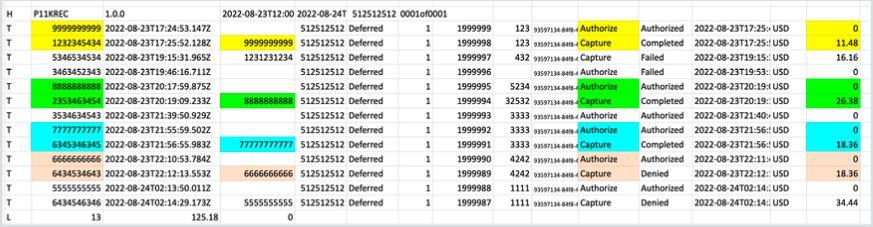
In this case, the original transaction was an authorization, and the child transaction was the capture.
The Trail shows the total number of transactions that were part of the report and the total amount of the transactions created during the reporting period.
Reconciliation & Funding report fields
Each line in the Reconciliation File is prefixed with a Record Type Indicator that dictates the type of information it conveys.
Header
The first line of the report is always the Header. For example:

The following table lists the fields and information contained in the Header.
Transaction record
A transaction record provides details for an event that occurred with the merchant. For example:

The following table lists the fields and information contained in the transaction record.
Trail
The Trail indicates the end of the report and is a summation of the records within the report. For example:

The following table lists the fields and information contained in the Trail.