

Reconciliation Report-BNY
Reading the Reconciliation Report
The Reconciliation Report contains any transactions that were created during the reporting period (excluding RTP transactions).
How to Read the Reconciliation Report
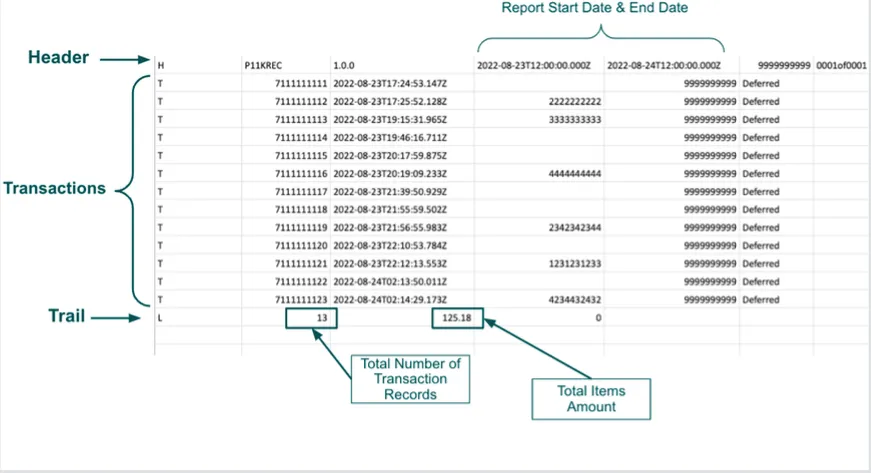
The Reconciliation Report consists of individual rows of data. Each row provides one of three types of data:
- Header
- Transaction Record
- Trail
Each row contains only one type of data and begins with a Record Type Indicator, which conveys the data type. For example, the file header rows indicator is H while the individual transaction rows have an indicator of T.

Every report begins with the Header and ends with the Trail.
All transaction records in the report reflect the transaction events created during the reporting period. The event status will reflect the status after the event for the record.
Some transactions will have a parent transaction ID, or original transaction ID, as shown in the example below.
The original transaction was an authorization, and then the child transaction was the capture.
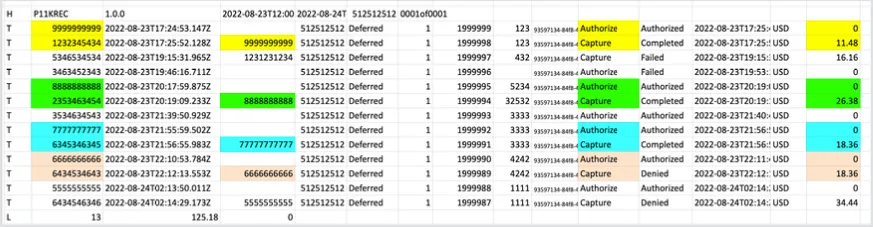
The trail shows how many transactions were part of the report and the total amount of the transactions created during the reporting period.
Reconciliation Report Fields
Each line in the Reconciliation File is prefixed with a Record Type Indicator that dictates the type of information it is conveying.
Header
The first line of the report is always the Header and it looks like this:

This line contains the following fields and information:
Transaction Record
A transaction record provides details for an event that occurred with the merchant and it looks like this:

This line contains the following fields and information:
Trail
The Trail indicates the end of the report and is a summation of the records within the report. It looks like this:

This line contains the following fields and information: