View account balances
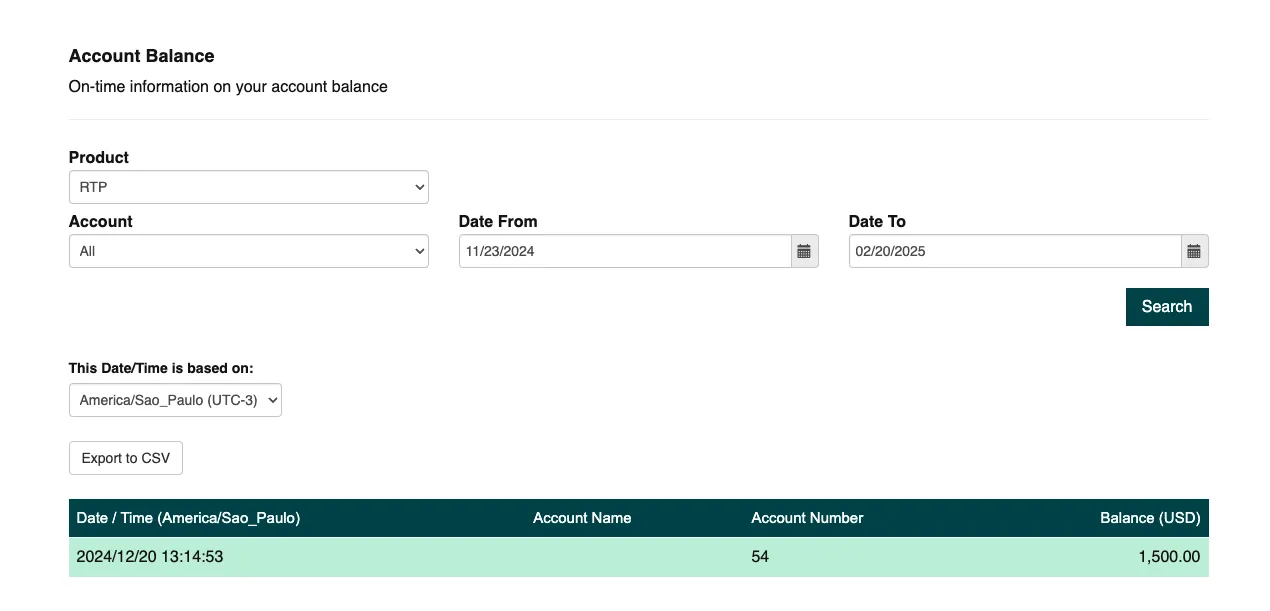
The Account Balance page provides a real-time view of your account funds. This feature allows you to track balances for accounts enabled for Real-Time Payment (RTP) or Electronic Funds Transfer (EFT) transactions. The balance automatically updates every hour.
Supported transaction types
The following table lists the transaction rails Trustly supports.
Use the Account Balance page
To view your specific account data, use the filtering options available on the page.
- Select a Product: Choose RTP or EFT to narrow the balance view to a specific transaction type.
- Select an Account: You can select a specific account or choose to view data for all accounts.
- Define the Date Range: Set a maximum 90-day range for your query. The end date cannot be more than 90 days after the start date.
After you set your filters, click Search to display the results.
Date and time display
The table displays dates and times based on the time zone you select using the dropdown menu. If you change the time zone, this only adjusts the time displayed in the table; it does not change the underlying data itself.
Export your report
Click “Export to CSV” to download the data. When the report converts to a CSV file, the time values are automatically adjusted to reflect the currently selected time zone. This ensures your exported data is consistently presented in your preferred local time.