

Choose an integration
Integrating Trustly solutions allows your customers to pay or receive funds by signing in to their online banking interface directly within your website or application. This secure, direct-to-bank model reduces fraud risks and transaction costs while offering a familiar authentication experience for users.
Before you begin, you must select the integration model that best fits your business needs.
Technical requirements
- Client-side SDK: All Trustly pay-in, pay-out, and data workflows rely on the client-side SDK to present the Trustly Lightbox to the user. See frontend integration to get started.
- QR Code API: The Trustly Scan and Pay workflow requires server-side integration with the QR Code API to generate dynamic payment codes for physical devices.
Pay-in workflow
Trustly provides integration models optimized for both online environments and physical environments. Select the architecture below that aligns with your payment flow.
Online environments
For most online use cases, the Authorize and Capture (Deferred) model is the recommended integration.
The Instant Payments workflow (paymentType: 'Instant') is deprecated for new integrations. Trustly recommends using Trustly Pay for all use cases to ensure higher acceptance rates and risk optimization. If you are maintaining an existing integration, see Accept Instant Payments.
Physical environments
For physical casinos, Trustly provides a specialized workflow.
- Trustly Scan and Pay: A physical-to-digital workflow where a user scans a QR code on a physical machine to authenticate and fund it using their mobile device. This workflow utilizes a specialized Trustly microsite and requires server-side integration (
POST /qrcode/token). See Integrate Trustly Scan and Pay.
Pay-out workflow
If you need to send funds to a customer (gaming withdrawals, gig-economy payments), you must choose between the modern online banking flow or the manual account entry flow.
Retrieve data workflow
Use a data workflow if you need to verify information, tokenize accounts, or retrieve financial insights without processing a monetary transaction.
Terminology
The following table lists the core concepts and components used across all Trustly integrations.
Transaction lifecycle
Regardless of which integration model you select, money moves through the banking network in a predictable lifecycle. Trustly provides visibility into this lifecycle through API status updates and event notifications.
Payment states (capture and deposit)
When you collect funds (Capture) or send funds (Deposit), the transaction moves through the following states:
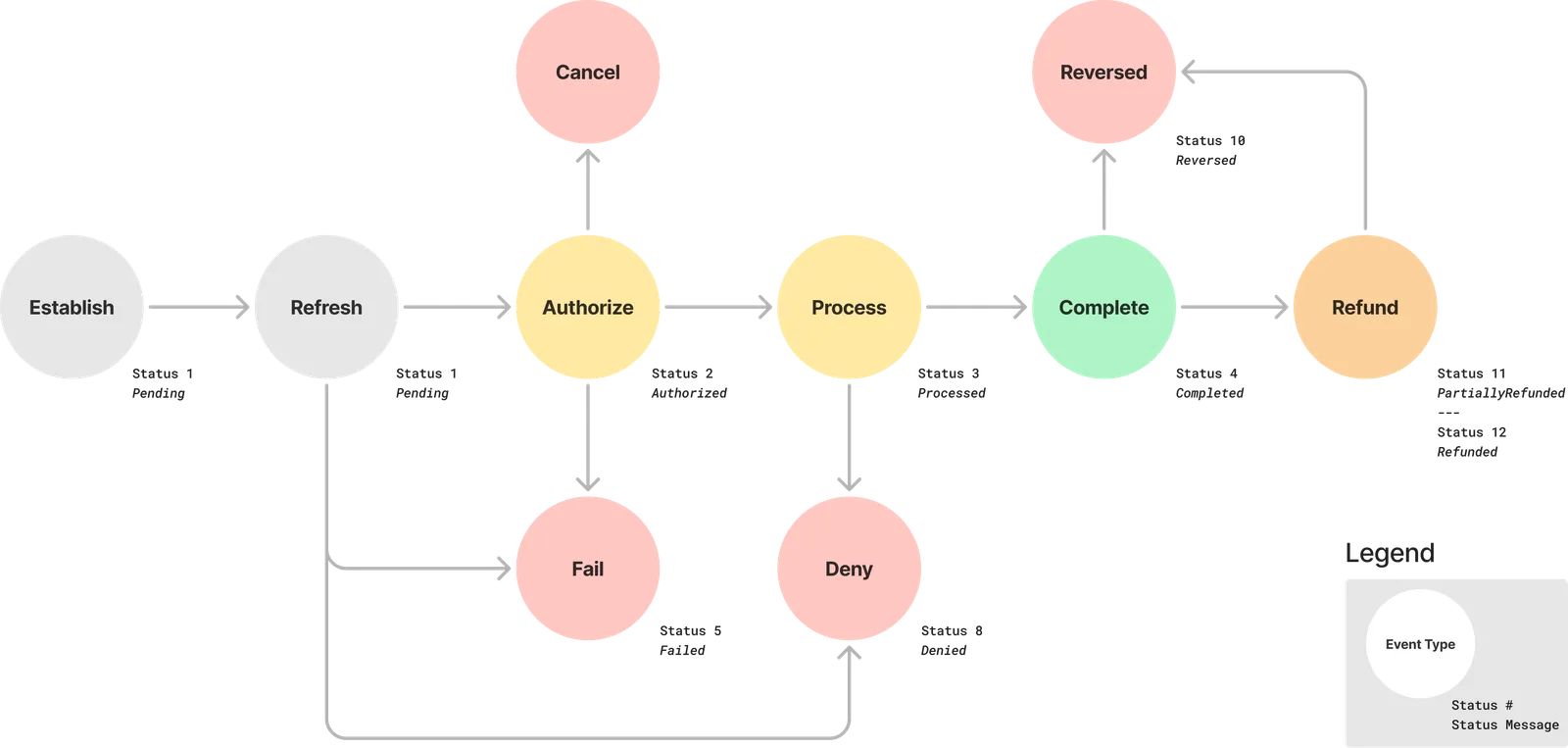
- Pending: A temporary state where the user must authenticate, select a bank, or provide additional information.
- Authorized: The request has been accepted by Trustly.
- Processed: Trustly has submitted the transaction to the banking network.
- Completed: The funds have settled. This represents a positive net settlement into, or a negative net settlement from, the merchant bank account since the last reporting window.
- Failed: A technical error occurred, or the user abandoned the session.
- Denied: The transaction failed due to insufficient funds or high risk.
- Reversed: The transaction was completed but later returned (for example, an ACH or administrative return).
- Refunded / Partially Refunded: The merchant returned some or all funds to the consumer.
- Canceled: The merchant or the system canceled the transaction before it could be processed.
Refund states
When you issue a Refund back to a user, the transaction follows a similar but distinct path:
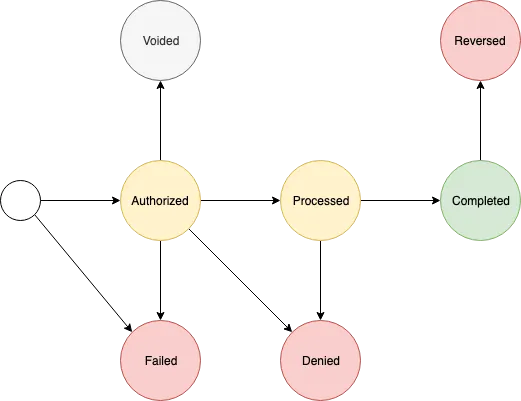
Refunds progress through the same Authorized and Processed states as capture and deposit transactions before reaching Completed.