
Choose an integration
Integrating Trustly solutions allows your customers to pay or receive funds by signing in to their online banking interface directly within your website or application. This secure, direct-to-bank model reduces fraud risks and transaction costs while offering a familiar authentication experience for users.
Before you begin, you must select the integration model that best fits your business needs.
Prerequisites
- Client-side SDK: All Trustly pay-in, pay-out, and data workflows rely on the client-side SDK to present the Trustly Lightbox to the user. See Integrate the client-side SDK to get started.
- QR Code API: The Trustly Scan and Pay workflow requires server-side integration with the QR Code API to generate dynamic payment codes for physical devices.
Pay-in workflow
Trustly provides integration models for both online and physical environments. For most online use cases, Trustly Pay is the recommended integration.
| Feature | Trustly Pay (Recommended) | Trustly Scan and Pay |
|---|---|---|
| Workflow type | Persistent Connection (Authorize + Capture) | Physical-to-Digital (QR Code → Mobile Auth) |
| Best for | E-commerce, iGaming, digital wallets, trading platforms, and recurring billing. | Physical casinos, Electronic Gaming Machines (EGMs), and Point of Sale (POS). |
| User experience | User authorizes a persistent connection. You can capture funds immediately, handle recurring payments, and enable one-click deposits. | User scans a QR code on a physical machine to fund it with their mobile device. |
| API interaction | paymentType: 'Deferred' (Client-side) | POST /qrcode/token (Server-side) |
| Implementation | See Accept payments with Trustly Pay | See Integrate Trustly Scan and Pay |
The Instant Payments workflow (paymentType: 'Instant') is deprecated for new integrations. Trustly recommends using Trustly Pay for all use cases to ensure higher acceptance rates and risk optimization. If you are maintaining an existing integration, see Accept Instant Payments.
Pay-out workflow
If you need to send funds to a customer (gaming withdrawals, gig-economy payments), you must choose between the modern online banking flow or the manual account entry flow.
| Feature | Send using online banking (Recommended) | Send using account details |
|---|---|---|
| Data handling | Tokenized. You handle a secure transactionId. | Raw Data. You handle Account and Routing numbers. |
| User experience | Customer logs in through the Trustly Lightbox for instant verification. | Customer manually types bank details into your UI. |
| Compliance | Low burden (Trustly handles the banking data). | High burden. You are responsible for PCI/NACHA data security. |
| API parameter | paymentType: 'Deferred' | paymentType: 'Disbursement' |
| Implementation | See Send payouts using online banking | See Send payouts using account information |
Retrieve data workflow
Use a data workflow if you need to verify information, tokenize accounts, or retrieve financial insights without processing a monetary transaction.
| Feature | Verify using online banking | Verify using micro-deposits |
|---|---|---|
| Workflow type | Information and retrieval | Manual Verification |
| Best for | KYC/AML compliance, tokenizing accounts for future payments, balance inquiries, and pre-filling user profiles. | Verifying account ownership when the user's bank does not support online login (fallback). |
| User experience | User logs in to their bank to grant access. Trustly fetches the requested data (name, address, balance) immediately. | User manually enters account info. Trustly sends small deposits that the user must verify 1-2 days later. |
| API interaction | paymentType: 'Retrieval' | Handled via API or explicitly configured. |
| Implementation | See Verify accounts using online banking | See Verify accounts using micro-deposits |
Terminology
The following table lists the core concepts and components used across all Trustly integrations.
| Term | Definition |
|---|---|
| Capture | The transaction type that finalizes a payment and triggers the actual movement of funds from the consumer to the merchant. |
| Deposit | The transaction type used to send funds from the merchant to the consumer's bank account (Payout). |
| EGM | Electronic Gaming Machine. Any physical slot machine or video terminal in a physical casino where a player places a wager using Trustly Scan and Pay. |
| Establish data | The JSON object containing all configuration parameters (such as amount, currency, and customer details) required to initialize a transaction. |
| Instant payout | A payout processed with Real-Time Payment (RTP) or FedNow, resulting in near-instant settlement to the customer's account. |
| Lightbox | The secure, Trustly-hosted user interface where the customer selects their bank and logs in to authorize a payment. |
| Merchant reference | A unique string generated by your system to identify a specific order or transaction. This value persists through the entire transaction lifecycle and appears in reports. |
| RTP/FedNow | Real-Time Payment network (RTP) or FedNow network. These are the underlying bank networks that enable Instant Payout settlement. |
| Request signature | A cryptographic hash used to secure front end redirects to and from Trustly. It ensures that the request originated from a verified source and has not been tampered with. |
| Split token | An authentication mechanism where the credential is split between the merchant and Trustly. You retain the merchant-side token to identify the user, which must be paired with the Trustly-side token to authorize a transaction. |
| TPAS | Trustly Payment Agent Service. The integration layer that handles the connection between the casino's system (CMS) and Trustly for Scan and Pay transactions. |
| Transaction ID | A unique, 15-character numeric identifier generated by Trustly for every transaction. You use this ID to interact with the Trustly API (e.g., to capture funds or issue refunds). |
| Unsettled | A transaction has been submitted to the banking network but funds have not yet cleared. During this period, the funds are not yet available for pay-out or use. |
| Webhook | An asynchronous message sent by Trustly to your server (notificationUrl) to inform you of status changes, such as when a pending payment becomes authorized. |
Transaction lifecycle
Regardless of which integration model you select, money moves through the banking network in a predictable lifecycle. Trustly provides visibility into this lifecycle through API status updates and event notifications.
Payment states (capture and deposit)
When you collect funds (Capture) or send funds (Deposit), the transaction moves through the following states:
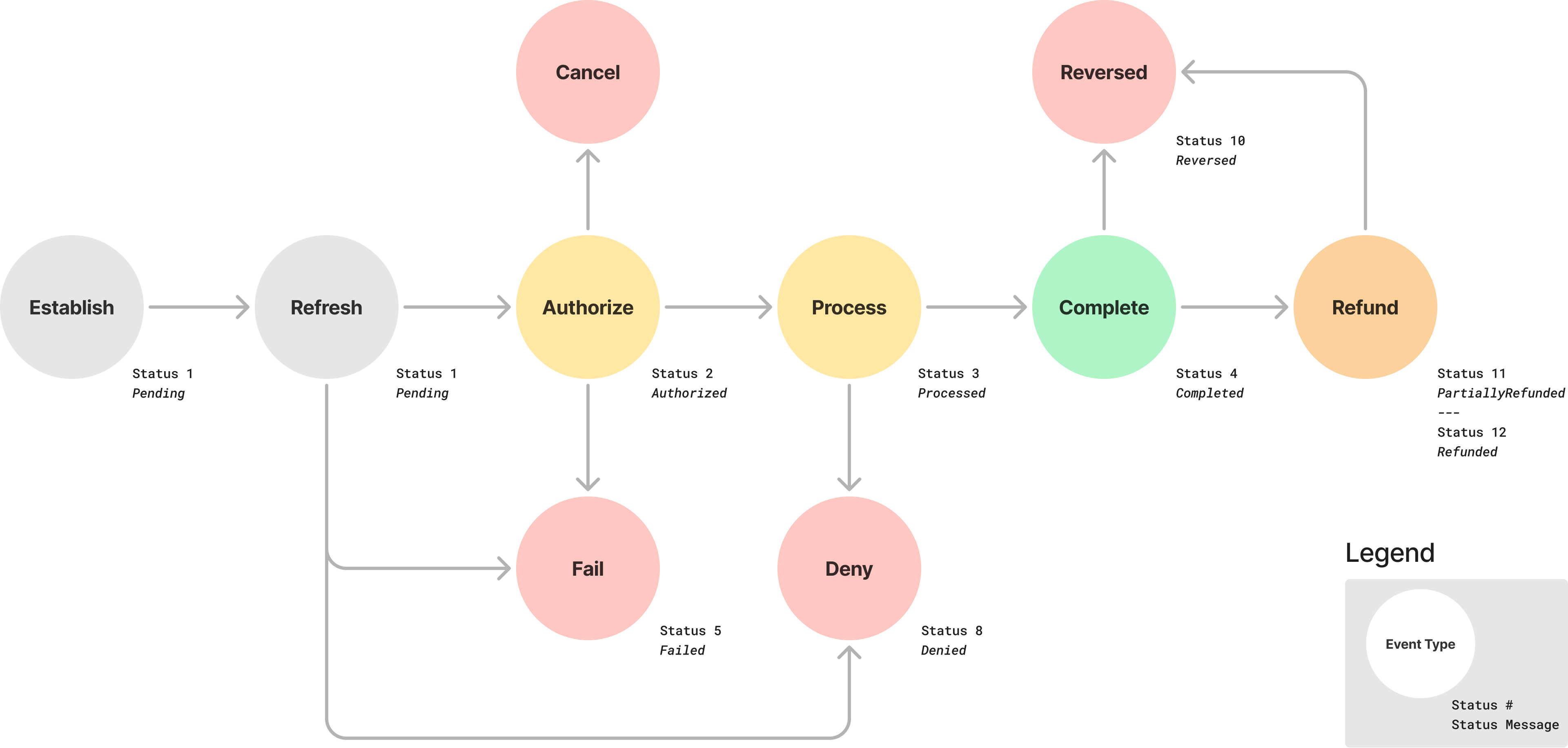
- Authorized: The request has been accepted by Trustly.
- Processed: Trustly has submitted the transaction to the banking network.
- Completed: The funds have settled. This typically occurs after three banking days.
- Denied: The transaction failed. For example, due to insufficient funds.
- Reversed: The transaction was completed but later returned. For example, an administrative return.
Refund states
When you issue a Refund back to a user, the transaction follows a similar but distinct path:
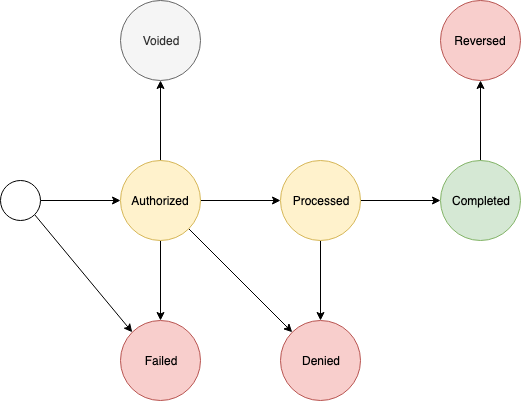
Refunds progress through the same Authorized and Processed states as capture and deposit transactions before reaching Completed.
Updated 28 days ago